Created By: Jim Zucker(LinkedIn), Cathy DeMarco, Tricia Zucker(LinkedIn)

Available on iPhone, iPad, and Mac.
Parent’s Guide · Privacy Policy · Send feedback on the App Store
What is iInteract?
iInteract: i Feel, i Speak is a free communication board (AAC) app for children and adults with communication needs. Your child taps a colored panel, taps a picture, and the app speaks the word out loud — clear, simple, and built to grow with them.
It comes with seven ready-made panels covering feelings, needs, and everyday activities, in English, Spanish, or Chinese. You can rename any built-in panel or word to match the words your child uses — and reset to the original anytime. In Customize mode you can also add your own panels with your own photos and your own recorded voice, so the board can speak about grandparents, favorite snacks, or anything specific to your child. An optional PIN and a press-and-hold parent gesture keep the editor out of little hands.
Created by two longtime special-education teachers (20+ years each) working with a software engineer, iInteract has been used by parents, therapists, and classrooms for over a decade. It’s free — no accounts, no ads, no tracking, and nothing ever leaves your device or your private iCloud.
New to iInteract? The Parent’s Guide is a friendly, screenshot-by-screenshot walk-through.
What’s new in 4.0
- Make the boards your own. Rename any built-in panel or interaction word right in Edit Panels, with one-tap reset to the original. Edits sync across your devices.
- Choose a language. Show the built-in panels in English, Spanish, or Chinese (Settings → Display → Language) — titles, the words under the pictures, and the spoken word all follow your choice. A few food pictures adapt too: a Spanish board shows nachos, a torta, and pan dulce; a Chinese board shows a rice cracker. Your own panels and recordings are untouched. New installs start in your device’s language when supported; upgraders keep what they had.
- Talking buttons. A button with no recording now speaks its word aloud in your chosen Boy/Girl voice — so a picture you add without recording still talks.
What’s new in 3.5
- Guided onboarding wizard. The first time you open iInteract, a friendly step-by-step setup replaces the old string of first-run pop-ups — Welcome, Voice (with ▶ preview), Show Words, Mode, PIN, Parent Access, and (on iPhone/iPad/Mac) Privacy & sync. Every choice is changeable later in Settings; upgraders just tap through pre-filled pages.
- Show Words Under Pictures. A new Display setting prints each picture’s word beneath it to support early readers. On by default for fresh installs; syncs across your devices.
- Settings → About. App version, a Privacy Policy link, and the copyright line in one place (the Flutter/Android build also lists open-source licenses).
- Type-to-confirm Erase All. “Clear All My Data” is now Erase All My Data and requires typing
ERASEto enable the destructive button (PIN first, if set) — so a wipe can’t happen by accident. - Protected iCloud-sync off (iOS). Turning iCloud sync off now requires your PIN (if set) plus typing
STOP. (Android is local-only.)
What’s new in 3.4
Parent access
- Parent Gesture. Long-press the “iInteract” title to open parent settings. Auto-locks back to kid view after 10 minutes.
- In-app Settings. Tap the gear ⚙️ for every option (voice, mode, Edit Panels, PIN, iCloud, Erase All). The iOS Settings app surface still works — set a value in either, the other reflects it.
- Mac Settings window. On Mac, the gear (or ⌘,) opens a dedicated window. Auto-closes after 10 minutes idle.
Cross-device
- One setup, every device. Your Parent Access mode, PIN, panels, voice, and Mode all sync via iCloud across iPhone, iPad, and Mac.
- One-tap Erase All. PIN-gated; cascades to every signed-in iCloud device within seconds.
PIN safety
- Forgot PIN everywhere. Every PIN prompt offers Forgot PIN — answer your security question, the PIN clears. No more delete-and-reinstall.
- Cleaner lockout. After the 5-attempt lockout expires, you get a fresh 5 tries (was: 1 wrong PIN re-locked instantly).
Quality of life
- Screen Stays Awake. Settings → Display keeps the screen on while your child is choosing — 1 / 5 / 10 minutes or until you leave the app. Default 5 minutes.
- Smoother editor flow. Back from Edit Panels returns to Settings (not the main screen). Pictures display at natural aspect ratio.
- Cross-platform UI parity. iOS and the Android port look and behave identically for the main panel list and detail screens.
- No disruption for upgraders. Existing 3.1.3 users keep their setup. A one-shot Parent Access picker introduces the new gesture mode without changing anything else.
What’s in the app
You choose how the app behaves. Open Settings → iInteract → Mode:
| Mode | What you can do |
|---|---|
| Default | The seven built-in panels behave exactly like 1.x. Pick a boy or girl voice and that’s it. |
| Configurable | Rename, hide, or reorder any built-in panel (and its words). No new content. |
| Customize (default on fresh installs) | Everything Configurable does, and create your own panels with your own photos and recorded voices (up to 6 items per page). |
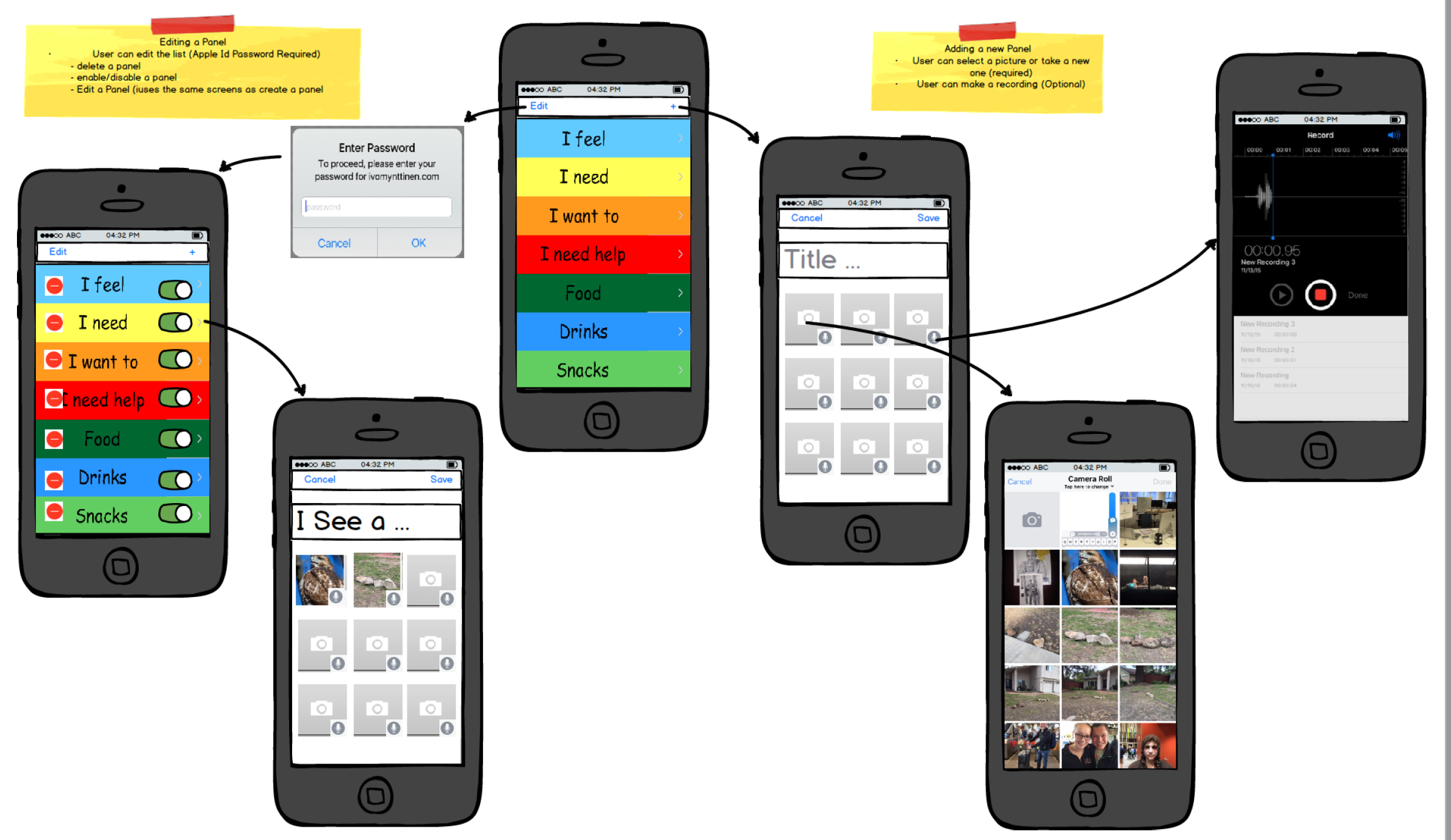
When Configurable or Customize is on, the main screen shows a gear button (or, in Long-Press Gesture mode, a long-press on the title opens parent settings). Tap it to manage your panels — toggle visibility, drag to reorder, or (in Customize) add a new one with a name, color, photo, and a boy + girl voice you record yourself. Photo selection uses the standard iOS photo picker; voice recording uses the same pattern as Messages voice notes.
Optional PIN protection. From the editor’s Security section you can set a 4-digit PIN that’s required before the editor opens. Five wrong attempts trigger a one-minute lockout. If you ever forget the PIN you can answer the security question you set when creating it.
Lock the app for your child with Guided Access. iInteract adds a Lock Editor toggle to iOS’s Guided Access Options sheet — flip it on and the configuration gear stops responding to taps for the duration of the Guided Access session. See the Parent’s Guide for the full setup walk-through.
End-to-end iCloud sync. Custom photos, voice recordings, panel titles, layouts, PIN, Mode, and Parent Access mode all sync between your iPhone, iPad, and Mac through your personal iCloud account. Nothing is ever sent to us or any third party. See PrivacyPolicy.md.
Apple Watch. Built-in panels mirror to your watch in the order set on iPhone, with hidden ones respected. Requires watchOS 10.4 or later.
Clear All My Data. A one-toggle wipe (in-app Settings or iOS Settings → iInteract) removes every custom panel, picture, recording, trashed item, and PIN — locally, from iCloud KVS, AND from CloudKit, and cascades to every other iCloud-signed-in device within seconds. PIN-gated.
Background
The application is based on the widely used practice to create communication boards that are used to help the children interact on a daily basis.
This application is a being developed jointly with my wife and her close friend who both have 20+ years helping children with special needs learn the skills necessary to live independent lives.
Our concept is to provide visual and audio feedback to the child’s selection on the screen. In the future our thinking is to make it highly customizable and easy to navigate for daily activities and allow it to grow with the child.
License
iInteract is proprietary software. Copyright © 2010 – 2026 Jim Zucker, Cathy DeMarco, Tricia Zucker. All rights reserved. See LICENSE for the full text.
Third-party software
The native iOS / Mac Catalyst / watchOS app has no third-party dependencies — no CocoaPods, no Swift Package Manager packages, no vendored libraries. The cross-platform Flutter port (Android, web, and Flutter-built iOS/macOS) uses pub.dev packages under permissive licenses (BSD-3-Clause / MIT / Apache-2.0); see THIRD_PARTY_LICENSES.md for the full list, or open Settings → About → Open-source licenses inside the running Flutter app for the bundled license texts at runtime.
Release notes
- 4.0 - Editable built-in panels: rename any built-in panel or word with one-tap reset (synced); board language picker (English, Spanish, Chinese) for built-in titles, words, and spoken word, with a wizard Language page; never auto-switched for upgraders, device-language default for new installs; translated built-in titles on the watch
- 3.5 - Guided onboarding wizard replaces the first-run pop-up chain (iOS + Android); Show Words Under Pictures (Display setting, on by default, synced); Settings → About (version, privacy policy, copyright); Clear All renamed Erase All My Data with type-
ERASEconfirmation; iOS iCloud-sync-off now PIN-gated + type-STOP - 3.4 - Parent Gesture comes to iOS (long-press the title for Edit Mode); cross-device iCloud sync of Parent Access mode + PIN + Mode + Voice; Erase All cascades across iCloud devices; Mac Catalyst dedicated Settings window (⌘,); Customize is the fresh-install default; Screen Stays Awake default bumped 1m → 5m
- 3.3 - In-app Settings; Forgot PIN on every prompt; post-lockout attempts reset; Clear All re-runs first-launch flow; cross-platform iOS/Android UI parity; Screen Stays Awake (Display setting)
- 3.1 - End-to-end CloudKit sync of custom panels, photos, and voice recordings; watch app rewrite in SwiftUI; cross-platform test matrix
- 3.0 - Three-mode configuration (Default / Configurable / Customize), in-app editor with 30-day Trash recovery, refined PIN flow
- 2.0 - Configurable panels: hide/reorder built-ins, create your own panels with photos and recorded voices, optional PIN protection, iCloud sync of titles + layouts (custom photos and audio stay local)
- 1.7 - Enabled MacOS support
- 1.6 - Enabled Apple Watch support
- 1.5 - Sep 2020 Upgraded to Swift 5/XCode 12, Apple Watch support disabled
- 1.4 - Dec 11, 2015 Apple Watch support Added
- 1.3 - Dec 4, 2015 Application changed to be Free in the App Store
- 1.0 - 2010 Released